Pre-Delivery Inspection Checklist
Land Checklist
❑ Start the boat with battery switches on and turn on 15 or 25 amp breaker.
❑ Turn on power to Seakeeper Ride (This may be the engine key switch on some boats)
❑ Select the Seakeeper Ride app on the MFD (Multifunction Display).
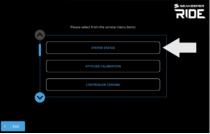
❑ Select the menu bar then select the service page.
❑ Select ‘System Status’ and ensure it shows as ‘Satisfied.’ If not satisfied, review Configuring instructions.
❑ Use the left and right arrows, deploy all Controllers to check the corresponding Blades deploy properly.
Verify Two Controller Assignment
Press the Left arrow 20 times and verify the Starboard Controller is deployed. Hold the center button for 5 seconds to zero all Controllers. Press the right arrow 20 times and verify the Port Controller is deployed. Hold the center button for 5 seconds to zero all Controllers.
Verify Four Controller Assignment
Press the left arrow 10 times and verify Starboard 1 Controller is deployed. Press the left arrow 10 more times and verify that both Starboard 1 AND Starboard 2 Controllers are deployed. Hold the center button for 5 seconds to zero all Controllers. Press the right arrow 10 times and verify Port 1 Controller is deployed. Press the right arrow 10 more times and verify that the Port 1 and Port 2 Controllers are both deployed. Hold the center button for 5 seconds to zero all Controllers.

❑ If the Controllers are not assigned correctly upon deployment, Factory reset and reassign the port 1/port 2 and starboard 1/starboard 2 Actuators.
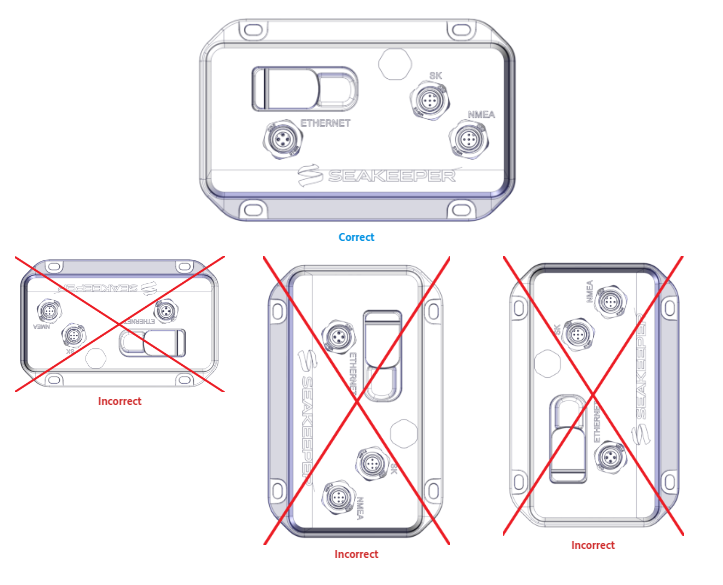
❑ Check which way the Software Module is facing on the boat. Please ensure it is facing BOW or STERN.
- Bow – means the logo and cable ports on the Software Module face the bow of the boat. (You must be on the bow of the boat looking at the Software Module to read the logo.)
- Stern – means the logo and cable ports on the Software Module face the stern of the boat. (You must be on the stern of the boat looking at the Software Module to read the logo.)
- Software Module MUST NOT be mounted on the following: Facing Port or Starboard, the deck facing up, facing the deck, and Seakeeper logo should be facing upright not upside down.
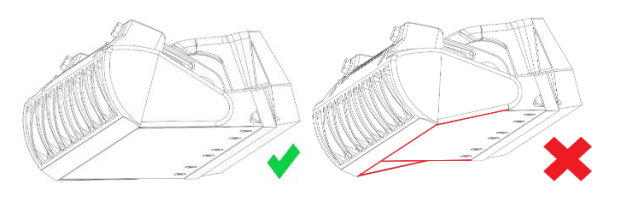
❑ Ensure the Seakeeper Ride Blades are at ‘Zero’ and that the surface from hull bottom to the Ride is smooth.
- Select the service page and the Diagnostics screen.
- Follow the diagnostics screen prompts for Port Controllers. If diagnostics fail, follow troubleshooting guide, or contact customer support for instructions.
- Follow the diagnostics screen prompts for Starboard Controllers. If diagnostics fail, follow troubleshooting guide, or contact customer support for instructions.
❑ While power is on, go to each Controller individually and attempt to move the Blade up and down by hand.

- When moving the Blade do not use excessive force, approximately 5 lbs (2.2 kg) is sufficient.
- The Blade should be ‘locked’ in place by the Seakeeper Ride control system.
- If there is no movement, the equipment passes this check. If the Blade moves, please review Seakeeper Ride | Check Actuator Friction – Seakeeper Manuals before Sea Trial.