Seakeeper 10 Installation Manual (90841-2) 10-254-0435 to Current
3.4 ConnectBox Connections
Seakeeper 10 Display Options
A compatible multifunction display (MFD) is required with the installation of a Seakeeper 10 to support the full functionality of the unit through the Seakeeper App in addition to the ConnectBox. The Seakeeper App provides an interface for controlling the Seakeeper 10 or viewing the Settings, Service, Info, and Alarm pages. The Seakeeper ConnectBox can be helm-mounted to provide an additional interface for the control of the Seakeeper 10 but does not replace the need for a Seakeeper compatible MFD.
The Seakeeper 10 has several control interface connection options to support the Seakeeper App:
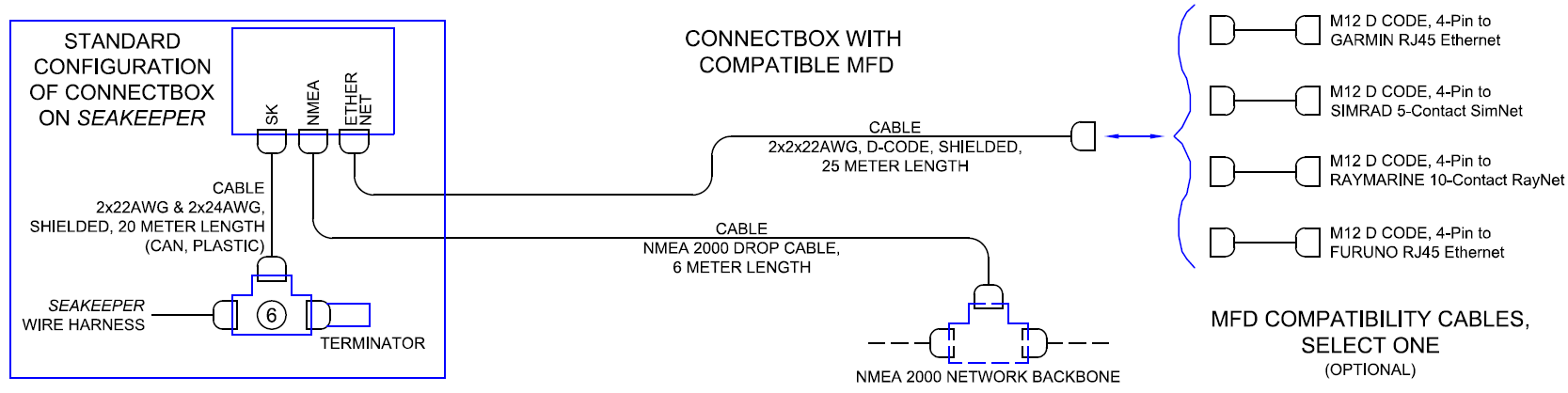
- Connect the Seakeeper 10 to a compatible MFD, as seen in Figure 26.
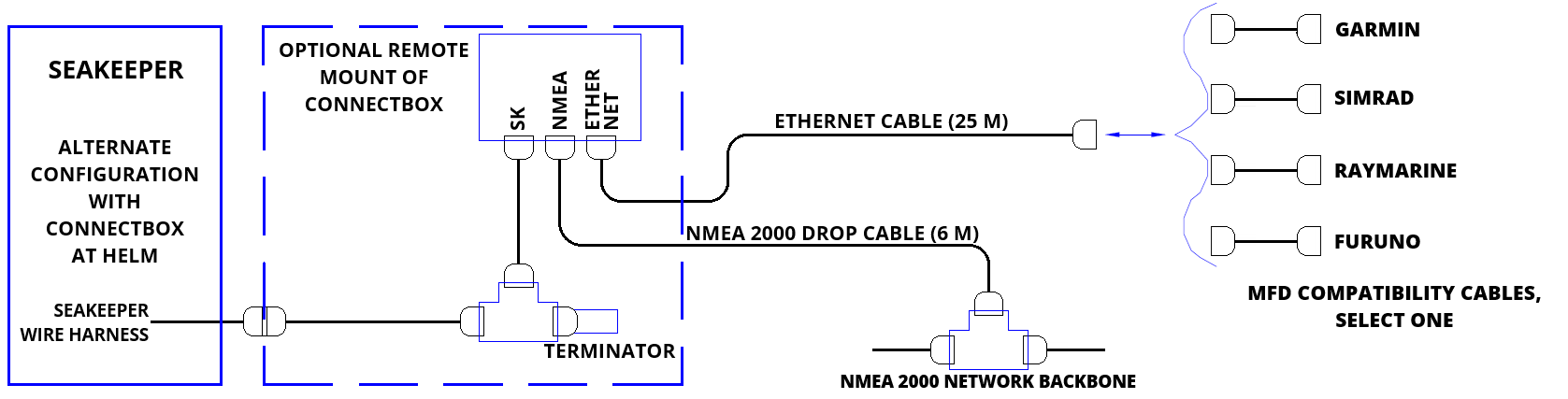
- Install the ConnectBox remotely, as seen in Figure 27.
The following figures provide schematics of display options. The subsequent sections outline the instructions and references for connecting the Seakeeper 10 to a compatible MFD or a remote-mounted ConnectBox and an MFD.
Connecting to a Compatible MFD
- The Seakeeper 10 can be connected to various available MFD systems. For manufacturer-specific MFD compatibility technical bulletins, refer to the Technical Bulletins Section of the Seakeeper Technical Library.
- MFD specific Technical Bulletins will be updated regularly as new MFD systems become available. Currently Garmin, Raymarine, NAVICO (Simrad, Lowrance, B&G), and Furuno offer compatible MFD models.
- Once a compatible MFD has been selected, refer to the appropriate manufacturer specific Technical Bulletin for integration instructions.
- Connect Seakeeper-supplied Ethernet Adapter cable, M12 D-Code, 82 ft (25 m), cable to MFD manufacturer-specific Ethernet adapter cable (See Figure 26 above). Custom Ethernet cables for specific MFD manufacturers are available through Seakeeper and must be purchased with the Seakeeper 10 when connecting to an MFD.
ConnectBox Helm Mounting – Optional
- Console space required: Approx. 3.41 L x 4.15 W in. (87 x 106 mm).
- Mounting Instructions, Surface Mount: See Drawing No. 90558 – Seakeeper ConnectBox Helm Mounting Kit, for details. Seakeeper ConnectBox 3D Model available upon request.
- Mount ConnectBox Replacement Blank insert into Seakeeper 10 enclosure at the original location of the ConnectBox.
NMEA 2000 Network Connection
The Seakeeper 10 requires a connection to the vessel’s NMEA 2000 network backbone via a drop cable to access the GPS signal. The Seakeeper 10 monitors information on the NMEA network to support and optimize its performance. If no GPS signal is detected, a warning will appear on the Seakeeper display. The Seakeeper will not spool down, but the unit’s operation will be limited until the GPS signal returns. Refer to TB-90896 – ConnectBox Installation Guide for details of installation.
- Install customer-supplied NMEA 2000 Tee Adapter (space required: approximately 4 W X 3 H in. (102 X 76 mm).
- Connect NMEA Backbone to Tee Adapter. NOTE: NMEA drop cable can be no longer than 19.6 ft (6 m) in length.
- ConnectBox can be remote mounted at a location closer to the NMEA backbone when the 6 m drop cable length is insufficient. See ConnectBox Helm Mounting instructions below.
- If the 6 m drop cable is insufficient in length, extend the NMEA 2000 backbone towards the ConnectBox.
- Connect Seakeeper-supplied NMEA cable (P/N: 30332) to the customer-supplied NMEA 2000 Tee Adapter on vessel’s NMEA 2000 backbone.
- An active NMEA 2000 compatible GPS signal is required on the vessel’s NMEA 2000 backbone to operate the Seakeeper 10.
- If no GPS signal is detected, the Seakeeper app will display a Speed Over Ground (SoG signal) warning. For NMEA connectivity guidance, see TB-90640.
- An active NMEA 2000 compatible GPS signal is required on the vessel’s NMEA 2000 backbone to operate the Seakeeper 10.